20 August 2014

The 7 Atari 2600 Games You Should Own First...[]

Hi all,

Sorry for the dearth of recent posts. I have a few that are currently in writing limbo; that you all need not wait longer, here's an entirely different post.

This may not be news to those of you who read this blog, but I recommend that everyone interested in video games acquire an Atari 2600 console. It's still my favorite system, and the one for which I've collected the most games.

The first difficult question, of course, is where to get the system. One can usually find an Atari 2600 in decent shape on sites like eBay for a decent price (considerably less than a new PS4, at least). You may also be able to find one at a flea market or garage sale for an even better price (largely because shipping costs are not involved, but also because the seller is less likely to be a retro game vendor and hence may not want as much for it). Whatever you do, I hereby challenge everyone who sees this to find and purchase an Atari 2600 (or 7800, since it's backward-compatible with the 2600).

The next question, then, concerns games. No use having the system without them, after all. Fortunately, you'll often find consoles bundled with a stack of games, typically loose carts but occasionally games with their boxes (in various states of repair).

Even so, the beginning Atari collector (especially one who, like me, was born after the golden Atari age) may be at a loss as to which games to obtain first. Here then, are my recommendations for the seven games that absolutely must be in your collection, and which you should look to obtain first.

7. Asteroids and Space Invaders


Okay, I'm cheating a bit on the first one, but these two really go hand in hand. They're the ones you expect to see, and for good reason. These are the ones that come to mind first when the Atari is mentioned. Fortunately, these are the two games you're most likely to get along with a system, even if you weren't expecting them. They seem to accumulate as if by spontaneous generation sometimes, and if you're not cautious you'll end up with a stack of each. Keep at least one of each around, though, because for all their simplicity, these games never get old.

Another thing to mention about Space Invaders in particular is its incredible amount of game variations. Most Atari games, if they have variations at all, only have around 10 or so. Space Invaders has 112; in fact, it's often labeled as "112 Tele-Games," or some variation thereof. If you just get a loose cartridge, be sure to look up the manual online to check out all the different ways you can switch-up the gameplay in this iconic classic. 

6. Joust


This is another one that never gets old, even if it does look a bit prettier on other consoles. This game is especially fun if you've got a second player to compete against (although it's 2-player in the style of Super Mario Bros., not direct versus as in Street Fighter or Combat). Take up your lance, mount your battle ostrich, and flap your way to victory! It's also fairly easy to find and hence won't cost you a lot. 

5. Centipede


This one practically defines addictive gameplay. If you happen upon an Atari Trak-Ball controller, definitely make sure this game is in your collection (along with Missile Command, but I'm already cheating on the 7 games here from the first entry). It's simple but challenging: fire away at the incoming centipede, watching out for its friends (like that irritating spider who appears every couple seconds). If you've ever played this in the arcades (lucky you), you'll know this game has incredible replay value as you try to get your high score just a bit higher (or at least to the next extra life).


4. Berzerk


Here's another one that'll have you going for hours, to the point where your hand may start to reshape itself around the joystick controller. Make your way through an endless maze, shooting robots and avoiding their shots. You'll soon get used to the controls, where you fire in the direction you're walking (diagonals take some practice).

Tip: Unless you're an absolute newbie, always play at least on Game 2, which features the menacing Evil Otto, who bounces on screen to chase you down should you take too long in a single room. Nothing adds challenge quite like a smiling time limit. He's always smiling, even as he's plotting your demise. The last thing you'll see is his smiling face...body...going through walls as if they weren't there. The fewer robots on screen, the faster he travels. Just gotta keep going.

3. Yars' Revenge


This one's another unquestioned classic, one I've mentioned at least once before on this blog. You take control of the bug-like Yar and go up against the ruthless Qotile. This one really gets challenging in the later stages, when the missile that follows you around starts to speed up, meaning you can't stay in one place for too long. It might only have two distinct stages, but the challenge is more than enough. It's also pretty common, so it shouldn't be too difficult to find or too expensive.


2. Seaquest


Finally, an Activision game on this list! Really, there are so many titles from Activision I could talk about, like Pitfall, Stampede, Kaboom!, Ice Hockey...

...but I'm limited here, and I'm trying to put in a nice variety. Seaquest is probably one of my favorite games for the Atari 2600, as anyone who's read this blog will know.

Short version: you control a yellow submarine (Beatles reference!) and must save six hapless divers per round, while avoiding sharks and enemy subs (who start to travel in twos and threes in later rounds), as well as a really annoying ship that travels along the surface to keep you from coming back up to recharge your oxygen.

So if you can only get one Activision game, get this one. If you can get two, get Pitfall....actually...can I rename this entry to Seaquest AND Pitfall?

2. Seaquest AND Pitfall!


Hey, this is my blog; I can cheat if I want.

Really, this is another expected one. If you've never heard of Pitfall, I'm sure you've seen it, or references to it. Jump across barrels and crocodiles, swing across lakes and pits, collect loot. Get this game; it's practically a requirement anyway. Tell anyone you have an Atari 2600, and they'll probably ask if you have Pitfall. Make sure you can tell them all "Yes."


1. Galaxian


Is that man playing Galaga? Nope; it's Galaxian, the game that started the whole series. This is one of the best games for the Atari 2600, without a doubt. It takes the basic formula of Space Invaders and adds the challenge of targets that fly directly at you. Remember that you can only have one bullet on screen at a time, so aim your shots well. Also, remember that you get more points for hitting an incoming enemy than one that's just keeping formation.

And whatever you do, don't get trapped in the corner. Bad idea. Keep moving, and watch for your openings to avoid getting trapped. Also remember that you can score big points by picking off the two red ships and then the white leader ship. If the challenge is too paltry, try using the Game Select switch to change your starting level. I usually start at level 9 (the highest) for the extra challenge.


So there you go...step number one is to get yourself an Atari 2600 console. Step number two is to get the games on this list. Have fun!

Peace,
JT

P.S. If you're the type who likes to watch YouTube videos and also a lot of Top 5 lists, you should totally check out my friends 2MooglesGaming. They're awesome. 


All images from AtariAge.com...they're a great resource, so I also advise checking them out regularly.


08 August 2014

...And That's BASICally It....[]

Those of you who follow me on Twitter will know that I've recently been working on some programming on my Atari 800XL computer (well, both of them, since I have two). That means using BASIC, and specifically Atari BASIC.

While I learned some BASIC as a young ninja, it's been a bit of a journey so far on the Atari, for a couple of reasons. Firstly, it's been a while, and I had forgotten a lot. Secondly, I never really learned all that much to begin with, being only around 10 years old at the time. And thirdly, Atari BASIC is a distinctly different flavor of BASIC from what I learned.

In any case, I recently managed to spit out a short program, which I also shared on Twitter. What I wanted was something that would spit out a specified lines of random letters/symbols either to the screen or to a printer.

Why would I want such a thing? Because reasons...Reasons I say!

Okay, I just wanted something that would (a) be a good test for my Atari 1025 dot matrix printer and (b) look cryptic to an observer, as if it were some secret code. *

So anyway...I figured I'd talk a bit about this program, my thought processes while writing it, etc. It'll be an educational column for some, especially in the area of how little I know, and I hope it'll at least be somewhat entertaining.

Disclaimer: Please do not mistake me for an expert (or even a mildly proficient) in programming. This is mostly just me playing around with forces I cannot possibly hope to comprehend.

Here's the full program:
1 ? "}":POKE 752,1
2 DIM Q$(1)
3 POSITION 10,3:? "# ROWS":POSITION 16,3:INPUT R
4 POSITION 10,5:? "PRINT":POSITION 16,5:INPUT Q$
5 IF Q$="N" THEN POSITION 10,6:? "OKAY, NO PRINT.":GOTO 10
6 IF Q$<>"Y" THEN POSITION 10,6:? "ERROR: ENTER Y/N":POSITION 10,7:
  INPUT Q$:? "}":GOTO 5
8 POSITION 10,6:? "OKAY, WILL PRINT."
9 POSITION 10,8:? "MAKE SURE PRINTER IS ON."
10 FOR W=1 TO 500:NEXT W:PRINT "}"
11 DIM Y$(80)
20 DIM X$(1)
25 FOR S=1 TO R
26 IF Q$="N" THEN GOTO 30
27 FOR I=1 TO 80:GOTO 40
30 FOR I=1 TO 36
40 X$=CHR$(INT(59*RND(1))+64)
50 Y$(I)=X$
60 NEXT I
65 IF Q$="Y" THEN LPRINT Y$:GOTO 80
70 ? Y$
80 NEXT S
90 POKE 752,0
100 END

I'm positive that this program has been written before, and better, but this is what I done wrote, and I'm sort of proud of it. By the way, wherever you see a "}" character, replace it in your mind with the "clear screen" symbol from Atari BASIC, which looks a bit like "↰."

If you're not familiar with BASIC, each line begins with a number which determines its order. Common practice is to begin with line 10 and enter new lines in multiples of 10 (or sometimes start with 100 and go in multiples of 100) so that, as needed, lines can be inserted in between others without re-numbering. That should give you a bit of an idea of the order in which some lines were added here (actually, I did re-do line 10 at least once, but you get the picture).

For those to whom this still looks like ancient Sanskrit, here's the overview: the program asks for a number of lines, and whether or not the output should go to a printer. Then it generates a line of random characters, then another, and so on until it has output the number of lines specified.  

So let's just take it line by line to see how it works:

1 ? "}":POKE 752,1 

First thing to note about this line is that "?" is a shortcut for the PRINT command, which tells the computer to print a text string. So this line first tells the computer to print a "clear screen" character, which blanks out anything on-screen at the time. The second part of the line (two commands can be on the same line if separated by a colon) is a command that directly changes a memory location — specifically, it turns off the cursor, which makes things look a bit neater.

2 DIM Q$(1)

This second line is here because of a peculiarity of Atari BASIC. While in some versions of BASIC you can just use string variables (contrasted with number variables) at will, in Atari BASIC you must first DIMension them, telling the program how many characters to allot the variable. So this line declares a string variable called Q$ which has a maximum length of 1.

3 POSITION 10,3:? "# ROWS":POSITION 16,3:INPUT R
4 POSITION 10,5:? "PRINT":POSITION 16,5:INPUT Q$

These two lines are the two big questions asked at the start. First, the (invisible) cursor is moved to column 10, row 3. Then the prompt "# ROWS" is printed, followed by an input for a number variable called R (the number of rows to print).

Then it moves two lines down, to column 10, row 5 and asks the second question, whether or not to print the output to a printer. Here is where we use the string variable Q$ which we DIMensioned a couple lines ago.

Also note another peculiarity of Atari BASIC: PRINT commands must be separate from INPUT commands. On a Commodore 64, for example, I could input instead 3 POSITION 10,3 : INPUT "# ROWS";R, but not so on the Atari.

5 IF Q$="N" THEN POSITION 10,6:? "OKAY, NO PRINT.":GOTO 10
6 IF Q$<>"Y" THEN POSITION 10,6:? "ERROR: ENTER Y/N":
  POSITION 10,7:INPUT Q$:? "}":GOTO 5
8 POSITION 10,6:? "OKAY, WILL PRINT."
9 POSITION 10,8:? "MAKE SURE PRINTER IS ON."

These next few lines are partially feedback to the user and partially error handling in regards to the INPUT command on line 4. Since the user may have entered any character at the prompt, it needs to weed out anything but "Y" or "N."

First, it handles the case where the user entered "N." It moves down to row 6, tells the user that the output will not be printed, and then moves to line 10 for further instructions.

The next line is there because ATARI basic only follows an IF/THEN model for conditionals, not an IF/THEN/ELSE model. If the IF condition is true, the THEN is executed, and if not it just goes to the next line. So now the program weeds out anything that isn't a response of "Y," since any "N" responses were caught by the previous line. For all of these responses, it prints an error message, allows the user to re-input for Q$, then moves back to the first conditional statement.

If anything made it through lines 5 and 6 without triggering one of the THEN clauses, it's because the user entered "Y." So the next two lines (there was a line 7 at one point) just offer feedback and remind the user that the printer needs to be turned on.

10 FOR W=1 TO 500:NEXT W:PRINT "}"
11 DIM Y$(80)
20 DIM X$(1)

Okay, now we really get into the operations of the program. First, line 10 uses a FOR/NEXT loop, which will be talked about in a couple lines. Basically what it does is tell the computer to execute a set of commands a given number of times. In this case, though, the loop is empty, so the computer does nothing 500 times (the 1 to 500 part). This is a sort of messy way (which depends on running in Atari BASIC on an 800XL) of causing a delay, which in this case is long enough for the user to read feedback messages before the second half of the line clears the screen again. A professional would use a more precise clock, but I'm not a professional.

Lines 11 and 20 DIMension two more string variables, which are the ones that are really going to be used in the program. Y$ has a maximum length of 80, and X$ has a maximum length of 1.

25 FOR S=1 TO R
26 IF Q$="N" THEN GOTO 30
27 FOR I=1 TO 80:GOTO 40
30 FOR I=1 TO 36

Line 25 starts another FOR/NEXT loop, using the variabl R that was entered in line 3. So for R times, the program will repeat whatever comes between this statement and a line that says "NEXT S."

The next two lines toggle between two different line lengths. Atari BASIC in the standard text mode can only display 40 characters across, while a printer can do 80 characters to a line. So if the user entered "N" for Q$, the program goes to line 30, which starts a FOR/NEXT loop that repeats 36 times (because the line starts a couple of characters in) and otherwise goes to the next line down, which starts a different loop that goes to 80. The second part of line 27 skips it past line 30.

So the loop started by either line 27 or line 30 will do the same thing (for R times, because it's nested within the S loop from line 25).


40 X$=CHR$(INT(59*RND(1))+64)
50 Y$(I)=X$
60 NEXT I
 

Here's the real mechanism. These two lines are the repeated steps that churn out the text.

Line 40 sets the X$ string variable equal to a random character. It does this by making use of the CHR$() function, which outputs the Atari ASCII (also known as ATASCII) character with a given numeric value. It also uses the built in RND() function, which outputs a random number between 0 and 1.

Between 0 and 1? Yes, that's right. The RND() function will give you some decimal value between 0 and 1 (and never 0 or 1). So to get it to give you a range of values, you have to get tricky. I want it to give me the range starting with character 64 ("A") and character 122 ("z"). This will also include a number of symbol characters (punctuation, etc.), which was an unintended side-effect. **

So at the heart of the expression in line 40, it takes a random number (the 1 in parentheses doesn't really have any effect) and multiplies it by 59, which is 123-64 (the random number never equals 1, so I have to go one beyond my target range). Then it uses the INT() function to strip out decimals and just use the closest integer. Then it adds 64. So now it will output random numbers from 64-122.

Line 50 is where I had to get creative. There's unfortunately no string concatenation function in Atari BASIC, so I couldn't just build up a line by going X$+X$+X$, and so on. However, it is possible to specify a character position within a string variable. Y$(1) means the first character of the Y$ string variable, and so on. So this line uses the step number of I (which is incremented by 1 each time the FOR/NEXT loop churns) as the position indicator on Y$ and copies over the randomly generated character of X$ onto it.

Line 60 completes the loop begun in line 27/30, which eventually builds up a line of the required length.


65 IF Q$="Y" THEN LPRINT Y$:GOTO 80
70 ? Y$
80 NEXT S


The next couple lines are the output end of the program. Depending on the value of Q$, the program will either use the LPRINT command to print the value of Y$ to the printer (and then go to line 80) or print it to the screen. Line 80 completes the loop begun in line 25 and causes the next line to be generated, until the required number of lines are generated.


90 POKE 752,0
100 END


Okay, here we are at the wrap-up. After everything's printed out, the cursor is turned back on and the program terminates (until the users types "RUN" again).

So yeah. Took me a bit of noodling to get this one to work, but there it is. Actually, there are a number of improvements I should make to it. For one thing, I should make the user hit a key at line 9 before it moves on, to be sure it doesn't execute before the user has a chance to turn on the printer. For another thing, it might be a good idea to add a line counter, especially when the user's printing a large number of lines to a printed page, as a bit of a progress meter. I have an idea of how I'd do it, but since I currently have no way of saving programs (gotta get an external floppy drive at some point), that's just gonna wait for now.

As I said, I am 100% positive this has been done before and better. But this is what I wrote...BASICally....


Peace,
JT


* Fun thing to do if you're using laptop running Linux in a public space: either open a new terminal emulator window or go to a virtual console and run either (a) sudo apt-get update or (b) cmatrix. People walking by will think you're either a hacker or a spy. Totally. 

** It wouldn't be straightforward to filter out the range of values for the punctuation characters the way I did it here. I could have just generated the text based on a string variable containing all the alphanumeric characters, but hey, that's hindsight for you.

Québec follow-up...[]

I can't believe I actually forgot to mention the name of the retro gaming store I visited while in Québec last month...

The store's name is La Planque Jeux Vidéo.

Be sure to check out their website, their Facebook page, and, should you ever find yourself in the city, their store. Seriously, it's awesome. Killer Instinct and Mortal Kombat 2 on free-play!


Peace,
JT


30 July 2014

When Retro Collecting Really Hertz...[]

So I got one of these the other day:


Behold the majesty...


That, my friends, is a Xonox Double-Ender cartridge. There are a number of these, some more common than others (but none extremely common, or cheap), all of which have two games inside one cartridge shell. This makes it incredibly irritating for those who like to keep their collections alphabetized.

So why am I bringing this up? Because while one of the games in the above cartridge worked fine with my semi-modern LCD television, the other one did not.

In case you're wondering, the one that worked was Chuck Norris Superkicks...because nothing stops Chuck.

To be specific, when I started up the game, the picture would appear to be scrolling much like an out-of-sync movie reel in an old Bugs Bunny cartoon. I cleaned the cartridge, tried a different system, and nothing seemed to fix the problem.

That is, of course, until I remembered a previous experience I'd had with another television set. When I first got my four-switch woodgrain Atari 2600, one of the games that came with it was Asteroids. When I plugged it into the system and tried to play it on my 47" LED HDTV, the picture wouldn't stay still. It flickered up and down, all out of sync. The other games I had worked fine, but this one just wouldn't cooperate.

So I switched to my small 24" LCD flatscreen in the other room, and voilà, Asteroids worked. The VCS has been sitting in that room ever since, because I can't be without Asteroids.

So how now to play a game that wouldn't even play on my smaller television? Play it on an old CRT television, of course.

For those unfamiliar with the term: a CRT (short for cathode ray tube) display is the type of television they don't make anymore, where an electron gun inside the unit would fire at the screen to make the pictures (Wikipedia explains it better than I do). The short version is that CRT televisions are the old boxy ones.

So I brought my trusty Atari 2600 Jr. upstairs to where I have an old TV/VCR combo sitting in a corner and plugged it in. As expected, the game then worked great (I mean, it's still not really all that good a game, but at least you could see what was happening).

Okay, JT, so how about the "why"? 

Why do I collect retro gaming, or why I figured that the CRT would work? Well, for the first case, it all started back when...

The second one. 

Oh. Well the thing to note about CRT displays is that there are no pixels, because the display is projected, not fixed. What it does have, though, are lines. The electron gun scans across the screen, displaying a line at a time to build up the image. So programs for the Atari 2600, designed with that in mind, could specify the timing of the scanlines in their code, so that they weren't limited to a set number of lines per screen. This is fine on a CRT, but an LCD or LED display has fixed lines, which causes synchronization errors. The frequency is all wrong.

Well that's lame for the retro collector, isn't it?

..which actually brings me back to the title of this blog post (If you don't know what Hertz is, I will again defer to Wikipedia for explanation).

One of the things that the retro collector has to keep in mind is that old games were designed for old equipment. So it's wise to keep some hanging about. Here are a few tips on dealing with the hardware requirements we must face:

  1. CRT Television sets: for the reason described above, but also if you plan on using a light gun for games like Duck Hunt. Light Guns for old systems worked in tandem with the timing of the scanlines to determine where the player is aiming. Therefore, they will typically not work with flat-panel televisions.
  2. RF Adapters: Most video game systems from the '70s and '80s output video via an RF modulator. They used a standard single RCA cable to connect from the console to a switchbox (into which you'd also plug the rabbit-ears antenna), which was then connected to the television via either a set of screw-in prongs or a UHF connector.

    The former are pretty much nonexistent on television sets these days, but you can still find the latter, as people still use them for cable service. Given that the switchboxes are cumbersome and not always reliable, you may want to invest a couple bucks into getting an RCA female to Coaxial male adapter from your local RadioShack (or other places, like AtariAge.com). Then, if you plan on using your set for cable TV as well as games, you can get a cable switcher (sometimes called an A/B switcher).

    If all you have is a monitor with no coaxial input, or if you don't want to bother with a switchbox for your cable, the other option is to get yourself an old VCR. Use the RCA-to-Coaxial adapter to plug the system into the Cable In of the VCR, then use a composite AV cable to plug it into your TV/monitor. As an added bonus, you'll get a much clearer picture this way.
  3. Proper power supply. Even if the plug fits, the output may not be appropriate. I found this out when trying to run an Atari Pong machine off a 2600 power supply; doesn't work. You can also find universal power adapters, in case you don't have an original, which have a veritable morning star of different plug ends to fit a variety of devices. Make sure to check the voltage and connector, or you may see sparks fly.
  4. A power strip/surge protector with rotating plugs. There are various styles of these. The reason behind this is simple: power adapters back then had huge boxes on them, so a regular power strip may not fit more than two or three devices.
I guess this post could also fall under the "PSA" category...well, I try to do my part.

Peace,
JT

22 July 2014

PSA: Atari 2600 vs. ColecoVision cartridges...[]

Hi all,

As I stated in my previous blog post, I recently visited a retro video game store that had a rack full of Atari 2600 cartridges. Unfortunately, either due to design or accident (hopefully just the latter), the Atari cartridges were interspersed with some ColecoVision cartridges.

For those not in the know: The ColecoVision was released in 1982 and represented a significant graphical leap forward from the Atari 2600 (although it is generally considered part of the same generation of video game consoles). One of its "innovative" new features was its controller:

Source: Google Image search

Look at that thing: it's got a telephone keypad and a coiled cord to match. This in addition to a joystick and two side buttons (which may or may not have been the inspiration for the Atari 5200 and 7800 joysticks...the 5200 came out just a few months later than the ColecoVision, so it's hard to tell). Certainly overkill in an era when most video games only needed one or two buttons at most.

So what did they use that keypad for? 

They used it for more buttons, of course. All ColecoVision games came with an overlay which fit over the number buttons and illustrated their functions (if they were used at all).
Source: Google Image search again.  

Okay then...

Now you say to me, "JT, you rambling, incoherent incompetent, what does this have to do with cartridges?" Glad you asked.

The Public Service Announcement Part

I did title this as a PSA, I suppose, so here's where I do my part to keep the public informed.

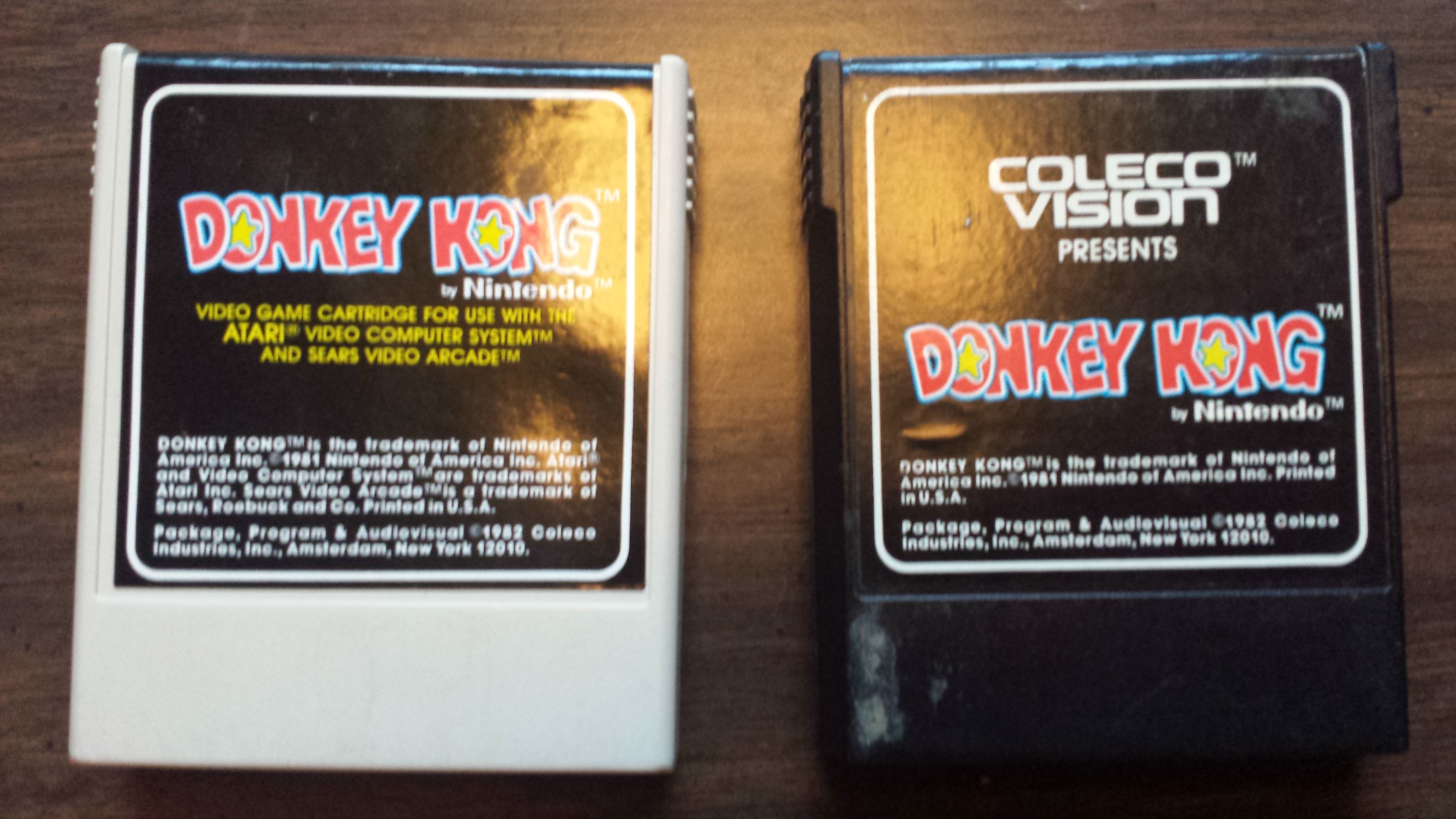
There are two easy ways to spot the difference between Atari 2600 and ColecoVision Cartridges. Look at a couple side by side:


On the left is Donkey Kong for Atari 2600; on the right is the same game for ColecoVision. Apart from the plastic color (which isn't uniform across either console), the cartridges look very similar. They are of similar size and have a similar grip indentation on the underside near the top. 

However, there are, as I mentioned, two easy-to-spot differences. Firstly, ColecoVision cartridges will state "ColecoVision presents" on them in nice bold letters. Secondly, and most readily visible, the ColecoVision cartridge has a slot in the back to hold the controller overlay. 

Therefore, if you are browsing (say, at a game store, flea market, or garage sale), through a bunch of loose cartridges, be sure to check the back before assuming a cartridge is for the Atari 2600. If it's got an overlay slot, it's definitely not (hey, that rhymes).


This has been a Public Service Announcement.

Peace,
JT

21 July 2014

Greetings from Québec... []

So the past few days I've been on vacation in Québec City. It's a fun place to visit, with lots of historical things to see (interspersed with the usual tourist traps) and amazing places to eat. Of course, it's also incredibly overpriced, but that's de rigeur (lol French).

On that note, it's of value to know at least a few words of French if you plan to visit. However, all you usually need to do is greet people with "Hello" instead of "Bonjour" and they will switch to English. So as long as you learn basic signage ("Entrée" and "Sortie" and "Arrêt", etc.) one should be fine.

I did also manage to find some time to say hello to a friend of mine, a local of Quebec City, whom I'd only ever spoken to online. As we're both collectors of retro video games, he insisted upon taking me to a shop not far from my hotel.
The store wasn't much to look at from the outside, but as soon as I entered I knew the trip had been worthwhile. Those in the Pittsburgh area will know of a store chain called The Exchange (I'm not altogether certain how widespread it is) which buys and sells movies, music, and games. This store was just the games, and it had them aplenty.

Not only did it have several shelves of Atari 2600 games, but it also had a sizable selection of both Nintendo, Super Nintendo, Famicom, and Super Famicom games, as well as Sega Genesis, Turbografx-16, etc. I was a bit annoyed to find several ColecoVision cartridges sorted among the Atari ones, but as they're easily identifiable (by the indentation in the back for the controller overlay, if not the word ColecoVision on the front), it wasn't too much of a problem.

What impressed me most, however, was a Vectrex console sitting on the counter. If only they had games for it other than Cosmic Chasm, which was being sold with the console (and which I already have).

Before we left, my friend and I had to go a few rounds on the free-play Mortal Kombat machine. Raiden is so cheap (muahahahaha).

I also walked away with five more Atari 2600 carts to add to my collection (see attached photo).


Fortunately, Canada also uses NTSC television, so there shouldn't be any region issues. EDIT: Yep, they all work.

Full disclosure: this is actually being posted from the United States. I started composing it on the plane in Québec before takeoff, out of range of the airport's wi-fi network (and International data usage is expensive!), so the rest of it is being written (pecked out on my cell phone's keypad) on the flight back, to be submitted once I am again on terra firma and regain access to the Internet.  It's the thought that counts.  EDIT: Actually, I posted it before walking through customs, so technically I wasn't in the country yet when it went live...

Final thoughts: If you haven't yet visited Québec City, do so, if only for a couple days. I think I still enjoy walking around Montréal more, with their vast, expansive underground complexes, but Québec is now officially Ninja-approved.

Peace,
JT

16 July 2014

Five Awesome Atari 2600 Games That Must Be Made...[]

Okay, fine, you got me. I'll do a list-based blog post. Let's just get through this...

Although the Atari Video Computer System was released in 1977, and the last Atari release for it was in 1990, games are still being made for the system. Most of these are either hacks of existing games or ports of games that should've made it to the VCS but didn't; however, there are a number of more or less original titles still coming out for the 2600, which is why I say Atari will never die.

It's this fact that makes my imagination often turn to titles I wish the world would see — sequels or spin-offs that never happened, or even original concepts that really should be done — some of which I have compiled here for your enjoyment.

1. Pac-Man vs. Evil Otto


I don't have to tell you who Pac-Man is, right? Please tell me I don't. If you don't know who he is, close your browser (Internet Explorer, right?) and come back when you find out the answer.

Less well known (but only slightly so) is Evil Otto, the villain of the classic arcade game Berzerk. He's a demented smiley face who bounces onto the scene whenever you start to take too long to get through a screen, heedless of wall, threatening instant death if you don't hurry to the next room.

Now imagine a game where you play as Pac-Man, but instead of semi-closed mazes in which you are more or less trapped, you must eat all the dots in one room and make it to the exit while dodging Berzerk robots. Should you start to take too long, Evil Otto bounces into view, and you'd better hurry to the stage exit before he gets you!

Like so. 
The mazes would have to be smaller, of course, or else you'd never finish in time. You start at one gate, which locks behind you. To open the gates again, eat all the pellets. In the center will occasionally appear a power pellet or a fruit. No time to wait in the corner for the robots to come get eaten when you've got to get out of there fast!

This game would be a mash-up of two incredible classics, and would make me very happy indeed.

2. Pitfall Hanna

People often talk about misrepresentation of women in video games, and I have to say I largely agree: games need more female protagonists. Back in the Atari 2600 days, though, you were lucky if your character looked like a human at all, as opposed to a spaceship, tank, plane, Yar, etc. So your character could be whoever or whatever you wanted.

There are exceptions, of course, like Pac-Man, Donkey Kong (and Jumpman), and Pitfall Harry.

Pitfall! is truly one of the great classics on the Atari VCS, and for good reason. It's an expansive world with deceptively simple controls and plenty of replay value. It even spawned a sequel, Pitfall II: The Lost Caverns (and an utterly execrable NES game, one we won't mention further).

I still think the Pitfall series is missing one thing, though. Pac-Man has his Mrs. Pac-Man, Mario has his Peach, and Donkey Kong has his Pauline (hehe), but where are the ladies in Pitfall?

This is where I see an opportunity. The world needs a completely new Pitfall adventure — with similar gameplay and graphics, but a whole new world to explore — this time with a female protagonist. The world needs more than just Lara Croft. The world needs Pitfall Hanna.


3. SeaQuest II: Deep Waters

Activision's SeaQuest has got to be one of my all-time favorite Atari games. It starts out slow and simple, but it gets tough quick.

So what could a sequel do to make it even better? Multiple screens, like Defender. I present my concept for SeaQuest II: Deep Waters:


Up in the top-left corner is a radar display, à la Defender, but with four screens arranged in a square layout. The player's ship is currently in the top-right corner in this screenshot/mock-up/quick slap-together job. The colored dots on the radar show the player his/her location (yellow), the locations of enemies (sharks in pink, subs in grey), and the divers (light blue).

I also decided the game needed floating mines which wouldn't show up on the radar, just because.

So now the game would involve going much further from the air and having to juggle multiple screens worth of targets. I'd love to dive into this game.

4. Star Wars: AT-ST Battle

The excellent Star Wars: Empire Strikes Back for Atari 2600 pitted the player against an unforgiving conga line of AT-AT walkers. This game would be based on the scene in Return of the Jedi where Chewbacca (and some fuzzballs) capture an AT-ST walker:
Source: Wikipedia

The game I'm envisioning would still be a horizontal scrolling shooter, but with you in control of a chicken walker with some hefty jumping ability and pew pew laser guns.

The forest moon of Endor is a lot trickier to navigate than Hoth, though. In Star Wars: AT-ST Battle, you must dodge Storm Troopers on speeders, Storm Troopers shooting from trees, and the occasional AT-AT walker as you keep the Ewoks from being decimated and work your way to blast open the shield generator base.

Here's where I'd love to have a fake screenshot to show, but my goodness did you even read that description? Screenshot totally not even necessary here. Plus, George Lucas has dark Sith powers, and Disney doubly so. It's risky even posting that screenshot up there from the movie.

5. The Yar Ultimatum (working title)

If you own an Atari 2600 and don't have Yars' Revenge, please obtain it swiftly and play it before continuing to read this post.

This is a game just screaming for a sequel (although I'm having difficulty figuring out a good title). But imagine the same setup as the original, only with more playfield variations:
   

Imagine facing down the Qotile with only a small square of Neutral Zone, or perhaps two slimmer ones on either side of a centrally located Qotile surrounded on all sides? Or perhaps the ultimate challenge, having to take on the Qotile Space Invaders-style, but with nowhere to hide?

I think this series is well overdue for a comeback.


Okay then, JT, you jelly-brained sluggard, are you actually going to make these games?

I wish I could. But hopefully someone with the savvy and dedication will see this post and be inspired. Perhaps not with the examples here (although I can only hope), but with some new idea even I couldn't imagine.

Hope this has been good for your imaginations as well. Feel free to comment your own ideas. 

Peace,
JT